Settings
Open Menu → Settings to configure Deepfield. The dialog intentionally mixes two different ownership levels: a small set of patch DSP settings and a larger set of global installation preferences.
[!IMPORTANT] Deepfield has four useful persistence levels:
.p00tch— portable patch content intended to travel with the effect.- DAW/session state — the exact live plugin instance stored in a project or DAW/plugin preset; this also snapshots patch-owned data so a project can reopen exactly as left.
- Global preferences — stored in Deepfield's
settings.jsonfor the current installation and shared by plugin instances.- Runtime only — temporary state that is deliberately not restored.
When this manual says a setting is “saved in
.p00tch,” that describes its portable owner. A DAW project can still contain a full snapshot of the live patch as part of the plugin state.
The screenshots below are cropped to the setting group being discussed so the values remain readable.
Audio / DSP
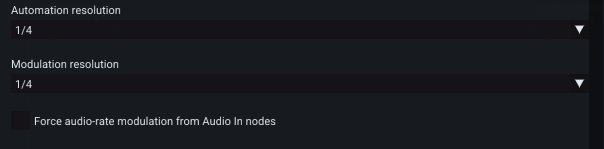
The Audio / DSP section contains both patch-specific processing resolution and the preferred host I/O layout. In the resolution crop below, both Automation and Modulation are set to 1/4; the optional checkbox underneath can force modulation paths originating at Audio In nodes to remain audio-rate.
Inputs and Outputs
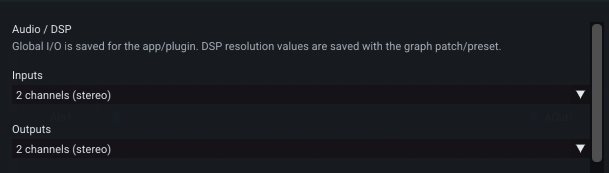
These choose the preferred plugin bus layout presented to the host. A host may need to reload the plugin instance, re-open the project, or renegotiate its channel layout before a changed bus count becomes available.
Audio In and Audio Out modules expose the channels actually available from the current host layout.
Saved in: Global preferences. The preferred input/output counts are written to Deepfield's global settings file, not to
.p00tchand not to the DAW-instance state. The DAW still decides which layout it actually grants to a particular instance.
Automation resolution
Sets how frequently host-automation-driven control work is evaluated inside the patch. A coarser setting reduces control work; a finer setting gives more frequent updates.
Saved in:
.p00tchas a patch DSP setting. A DAW session also snapshots the live value as part of the complete plugin state.
Modulation resolution
Sets the internal modulation-rate divider used by modulation-domain processing. This is one of Deepfield's main CPU/quality controls: many modulation-only islands do not need to run at full audio rate.
Saved in:
.p00tchas a patch DSP setting.
Force audio-rate modulation from Audio In nodes
Deepfield normally analyses signal usage and can run modulation-only parts of a graph at the cheaper modulation rate. Enable this option when audio entering through an Audio In node is intentionally being used as a fast modulation source and you need that downstream path kept at audio rate.
Saved in:
.p00tchas a patch DSP setting.
The three DSP-resolution options above are portable because they can materially affect how the patch executes and sounds. The preferred host I/O layout is not portable patch design; it is a user/plugin preference.
Controls
The Controls group affects editing feel rather than patch sound. The screenshot shows linear knob dragging enabled, followed by the fine-adjustment, mouse-wheel and trackpad sensitivity controls and the custom folder location field.
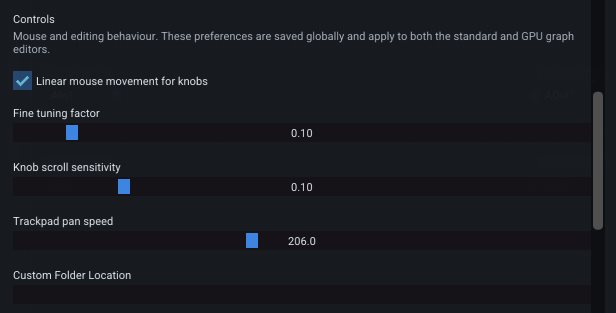
All Controls settings in this section are global preferences. They apply across plugin instances on the installation and are not embedded into a patch or DAW session.
Linear mouse movement for knobs
When enabled, dragging right/up increases a rotary control and left/down decreases it. When disabled, rotary controls use circular angle tracking.
Saved in: Global preferences.
Fine tuning factor
Hold Shift while dragging MacroKnobs and floating-point inspector controls for fine adjustment. The Fine tuning factor determines how much the movement is reduced. Lower values give finer control.
Saved in: Global preferences.
Knob scroll sensitivity
Controls how much a MacroKnob changes per mouse-wheel step. Holding Shift applies the fine-tuning factor to wheel movement as well.
Saved in: Global preferences.
Trackpad pan speed
Changes the scrolling multiplier used when panning the graph with a trackpad or mouse wheel.
Saved in: Global preferences.
Custom Folder Location
Sets the default folder used by patch/submodule file open and save operations.
Saved in: Global preferences. It is a local filesystem preference and is deliberately not portable with patches or projects.
Safety
The Safety section is intentionally small. The single Safety output clamp option is a runtime guardrail at the final plugin output; the explanatory text in the dialog is worth taking literally: it is global, optional, and only scans the final output when enabled.

Safety output clamp
When enabled, Deepfield scans the final plugin output, clamps it to full scale, and replaces invalid samples with silence. Internal graph signals are not clamped.
This setting is useful while constructing feedback systems, but you should still design feedback gain deliberately. A graph can become unstable internally long before its final output is clamped.
Saved in: Global preferences. It is not part of
.p00tchand is not carried by a DAW session to another installation. This is important when sharing a project: do not design a patch that is only safe because your local global clamp is enabled.
UI
The UI section contains display and editor-behaviour preferences. These do not alter the authored graph or front-panel document.
Unless noted otherwise, every setting in this section is saved in Global preferences and therefore applies to all instances on the installation rather than to the current .p00tch or DAW project.
Front panel style
The current front panel offers three visual styles:
- Meaty — the fuller original treatment, without the former drop shadows.
- Flat — subtle flat backgrounds around individual elements.
- Flatter — no permanent element backgrounds; the lightest visual treatment.
Group dividers are treated separately so they can organize a panel without looking like ordinary controls.
Saved in: Global preferences. The patch stores its canvas, widgets, positions, colours and background image, but not the user's Meaty/Flat/Flatter choice.
Undo notification time / size
Controls the duration and scale of notifications shown when Undo or Redo affects another graph scope, such as a nested submodule.
Saved in: Global preferences.
Relativity grid
Visual-only graph effect:
- Off — ordinary grid.
- Gravity — bends the grid toward the pointer.
- Frame dragging — adds a rotational/shearing deformation.
Warp strength changes the amount of deformation and Grid visibility changes the rendered grid intensity. These options do not affect audio processing.
Saved in: Global preferences. The instantaneous mouse position/warp animation is runtime-only.
Hofmann Mode
Optional animated grid lighting. Pulses animates the major grid; Fractal adds self-similar pulse octaves and activity on the minor grid.
Saved in: Global preferences. Animation phase is runtime-only.
Cable activity
Show cable activity animates audio cables from measured output-pin level. When the graph renderer is active you can also adjust metering intensity and colour. Cable activity decay controls how long the visual activity persists after peaks.
Cable metering is a display feature; it does not change the signal.
Saved in: the enable flag, intensity, colour and decay are Global preferences. Instantaneous cable levels/activity are runtime-only and are never serialized.
Graph renderer options
Depending on the build and platform, settings can include catenary cable rendering and the graph restore animation sequence.
Saved in: Global preferences.
Auto-fit editor to front panel
When enabled, loading a patch with a fixed front-panel canvas can resize the plugin editor to the patch's panel size. This is useful for patches designed to feel like self-contained effects with a deliberate panel proportion.
The distinction is intentional: the patch stores the authored canvas size, while Auto-fit stores the user's preference about whether Deepfield should resize its window to match.
Saved in: Global preferences. The patch's front-panel canvas and portable view sizes are
.p00tchdata; the Auto-fit switch itself is not.
Settings storage summary
| Setting family | Portable .p00tch | DAW/session | Global preferences | Runtime only |
|---|---|---|---|---|
| Automation / modulation resolution | ✓ canonical | ✓ live snapshot | ||
| Force audio-rate modulation from Audio In | ✓ canonical | ✓ live snapshot | ||
| Preferred plugin input/output count | ✓ | |||
| Mouse/knob/trackpad behaviour | ✓ | |||
| Custom folder location | ✓ | |||
| Safety output clamp | ✓ | |||
| Front-panel visual style | ✓ | |||
| Graph/grid/cable UI preferences | ✓ | |||
| Instantaneous meters, cable levels and animation phase | ✓ |