Patches, Base and Variants
A Deepfield patch contains more than a graph. It can include graph structure, module parameters, front-panel design, metadata, patch DSP settings, saved Variants and the information needed to restore the patch consistently.
[!IMPORTANT] Storage: Base/Default state, Variant definitions, Variant descriptions/membership/order and the optional startup Variant are portable
.p00tchcontent. The currently active Variant and exact live parameter state are also saved in the DAW/session snapshot so a project can reopen exactly as left.
Understanding Base/Default and Variants is especially important when creating factory-style content.
The Variant dropdown is both a selector and a small management menu. The screenshot below shows a patch whose current Variant is Fatter, with Base above it and the Variant commands underneath.
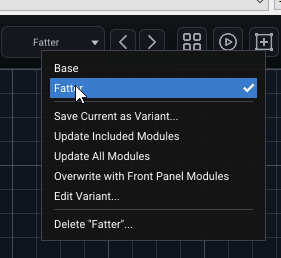
The previous/next arrows beside the dropdown are for fast auditioning. Open the dropdown when you need to create, update, edit or delete a Variant.
The Base / Default state
Think of the saved patch as the canonical Base state. In the UI, the baseline Variant is named Default.
Default is not an extra duplicate preset layered on top of the patch. It is the baseline to which alternate Variants return before their own captured values are applied.
This matters when switching from Variant A to Variant B: Deepfield restores the Default state first and then applies B. Parameters that B does not own therefore do not accidentally keep values left behind by A.
What a Variant is
A Variant is a named set of parameter values captured inside the current patch. It does not duplicate the whole graph and it does not create another .p00tch file.
Typical uses include:
- short / medium / long versions of a reverb;
- mild / wide / extreme modulation;
- different delay rhythms;
- several tuned configurations of the same effect;
- performance snapshots of the front-panel controls.
Creating and updating a Variant
Choose Save Current as Variant... to capture the current state under a new name. Depending on the save dialog/build, you can provide a name, optional description, capture scope and optional Load when patch is loaded choice.
Once a Variant exists, the dropdown gives you several deliberately different update operations:
- Update Included Modules recaptures the modules that already belong to the Variant and leaves its membership unchanged.
- Update All Modules expands/updates the snapshot using all Variant-capable modules in the patch.
- Overwrite with Front Panel Modules replaces the old capture membership with the modules represented on the front panel. This is useful when the panel is the intended performance surface and the Variant should follow it exactly.
- Edit Variant... changes metadata and explicit module membership without forcing you to rebuild the Variant from scratch.
The available capture scopes when creating/overwriting are:
- Front panel modules — the normal default. Capture the modules represented by the patch's front panel.
- Selected modules — capture only the modules currently selected in the graph.
- All modules — capture parameter state throughout the patch, excluding processors that are deliberately not Variant-capable.
Processors that are only structural boundaries, such as audio/submodule I/O nodes, do not need to participate in Variant capture.
Editing membership
Edit Variant... opens the membership editor shown below. The top section edits the Variant's Name and Description. The scrolling Included modules list is the important part: a checked module belongs to this Variant, while an unchecked module remains governed by Base/Default unless another graph relationship drives it.
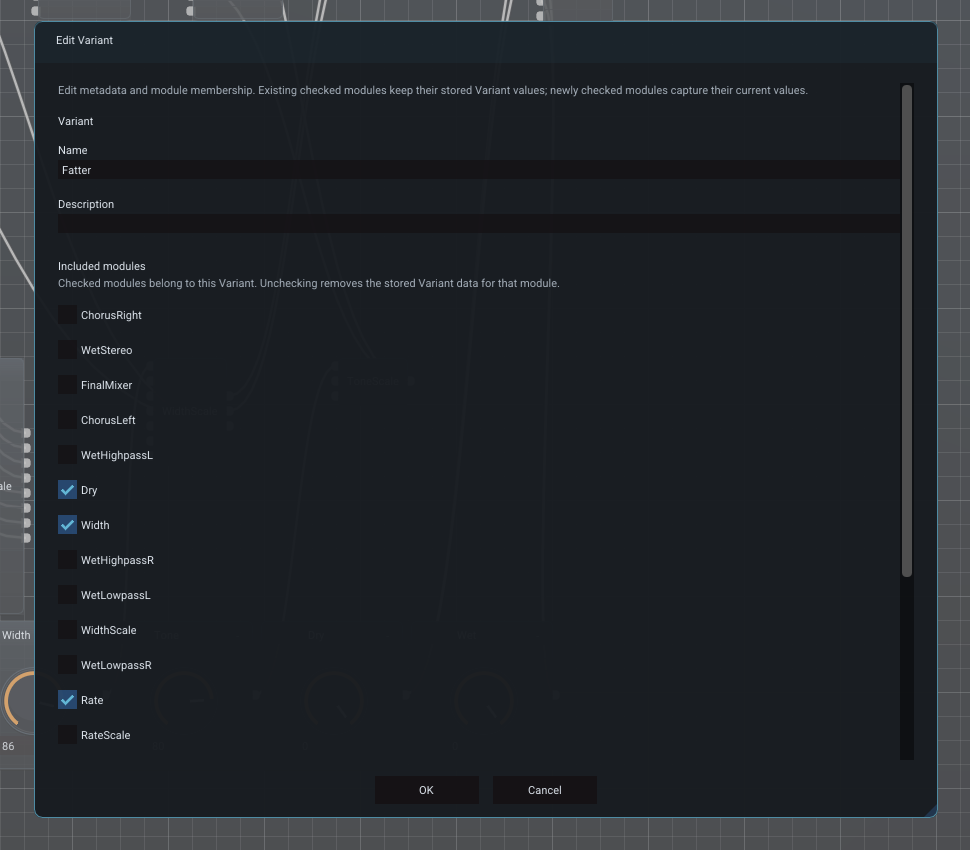
The dialog states the capture rule explicitly: existing checked modules keep their stored Variant values; newly checked modules capture their current values. Unchecking a module removes the stored Variant data for that module. This lets you refine scope without unintentionally recapturing every control that was already correct.
In the screenshot, only a few front-panel/control modules such as Dry, Width and Rate are checked even though many processing modules exist in the graph behind the dialog. That is a typical use of a focused Variant: capture the controls that define the alternate character, not the entire implementation.
Dirty indicators
Deepfield distinguishes patch changes from Variant changes. An asterisk on a Variant means a value owned by that Variant has changed since its saved snapshot. A patch asterisk indicates portable Base content has changed.
Derived values should not make a Variant or Base appear dirty merely because another connected source changed. Parameters driven by graph connections are treated as derived from that source.
DAW-instance-only state likewise does not belong in the portable patch dirtiness model.
Saving while a Variant is active
When you explicitly Save the .p00tch, Deepfield commits the current live values according to ownership:
- parameters already owned by the active Variant are written back into that Variant's stored snapshot;
- other portable parameters are committed to Base/Default;
- the Variant's membership does not silently expand just because the patch was saved.
This keeps the active sound intact without turning every changed control into Variant-owned state. The DAW/session state separately snapshots the exact live instance even before you save the portable patch file.
Saved in: the committed Base and Variant values are
.p00tchcontent. Unsaved live edits still survive a normal DAW project save through the session snapshot, but they will not appear when somebody loads the older.p00tchby itself.
When working on factory content, it is useful to think in two questions:
- What should this patch sound like at Default?
- What alternate parameter states should be stored as Variants?
Do not use a Variant to hide a graph change that really belongs in Base.
Resetting parameters
Resetting a parameter while a Variant is active returns it to the value appropriate to that Variant when the parameter is captured there; otherwise it returns to Default/Base. This is more useful than resetting to the module class's hard-coded constructor default.
Startup Variant
A Variant can be marked Load when patch is loaded. Only one saved Variant should be the startup choice. If none is marked, the patch opens in Default.
Saved in:
.p00tch. The startup choice is patch authoring intent; it is different from the DAW-instance's currently active Variant.
Host program change
Deepfield exposes its Variants as native plugin program slots so hosts can change them without the graph scanning MIDI Program Change in the audio callback:
- slot 0 = Default
- slots 1–127 = saved Variants in order
This allows a controller/DAW that maps MIDI Program Change to plugin program selection to switch Variants efficiently.
Saved in: Variant definitions/order are
.p00tch; the current host program/active Variant is DAW-instance state. Program Change messages themselves are transient events.