Automation and MIDI
Deepfield separates host automation assignments from direct MIDI controller assignments. Both can drive the same front-panel/control modules, but they serve different jobs and are intentionally stored at a different level from the portable patch.
[!IMPORTANT] Storage: host automation slot assignments and direct MIDI mappings are saved with the DAW/plugin instance state (including host/DAW presets that store the full plugin state). They are not written into
.p00tchfiles. This means loading or sharing a patch does not replace somebody else's DAW automation layout or hardware-controller mapping.
Opening the Automation Manager
Open the manager from the Automation Manager button in the common toolbar or from Menu → Automation Manager. It scans the root patch and nested submodules for controls that can act as automation sources.
The manager has two tabs:
- Automation — maps patch controls to Deepfield's stable host automation slots.
- MIDI — maps incoming MIDI CC, high-resolution CC, Pitch Bend or Channel Pressure directly to patch controls.
The search field at the top filters controls or automation slots. Refresh rebuilds the source list if the graph has changed while the manager is open.
Host automation
Deepfield exposes a fixed bank of 64 assignable host automation slots named Auto 001 through Auto 064. The bank is stable from the DAW's point of view even when a completely different modular patch is loaded.
That indirection is important. A patch control is free to come and go with the patch, while the host parameter IDs remain stable. You assign a control to a slot, and the DAW automates the slot.
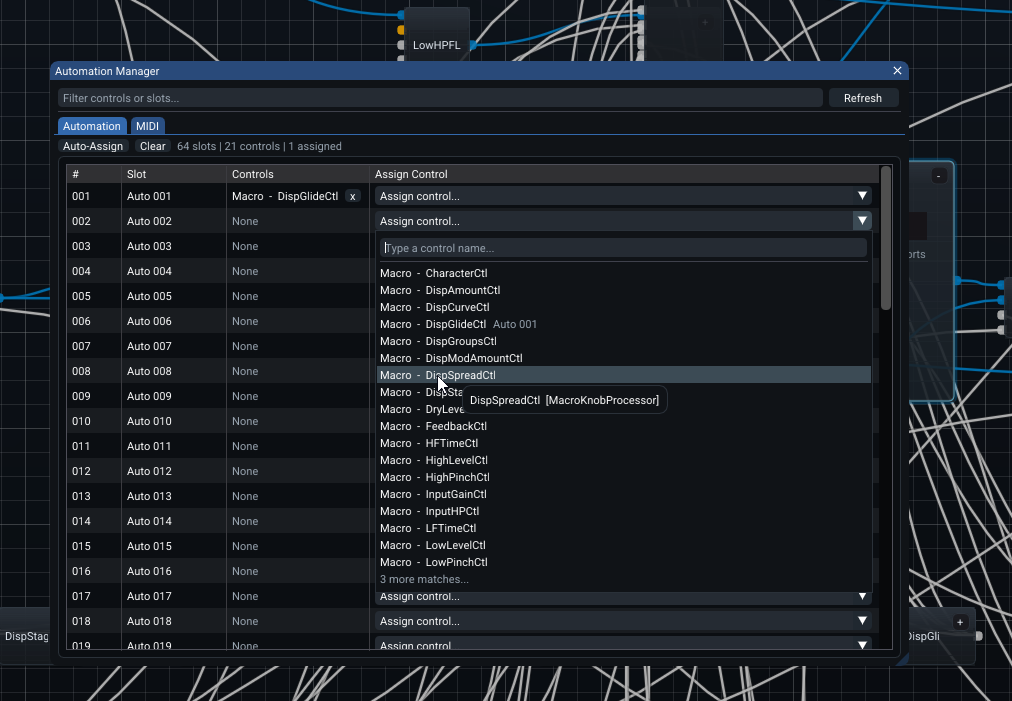
The Automation tab is organized around the slot bank:
- Auto-Assign fills empty slots with currently unassigned controls while preserving every existing assignment.
- Clear removes all host automation assignments. It does not clear MIDI bindings.
- The status text shows the number of available slots, automation-capable controls found in the graph, and currently assigned controls.
- # is the one-based slot number.
- Slot is the stable host-facing name, for example
Auto 001. - Controls shows every control currently assigned to that slot. Use the small x beside a control to remove only that assignment.
- Assign Control opens a searchable list of available controls. The list includes controls inside nested submodules and shows their graph path so similarly named controls can be distinguished.
A single control belongs to at most one automation slot. A slot can contain more than one control, which is useful when several patch controls should follow the same DAW automation lane.
Automation badges on the front panel
Automation-capable front-panel controls also have a compact shortcut, so a simple assignment does not require opening the full manager.
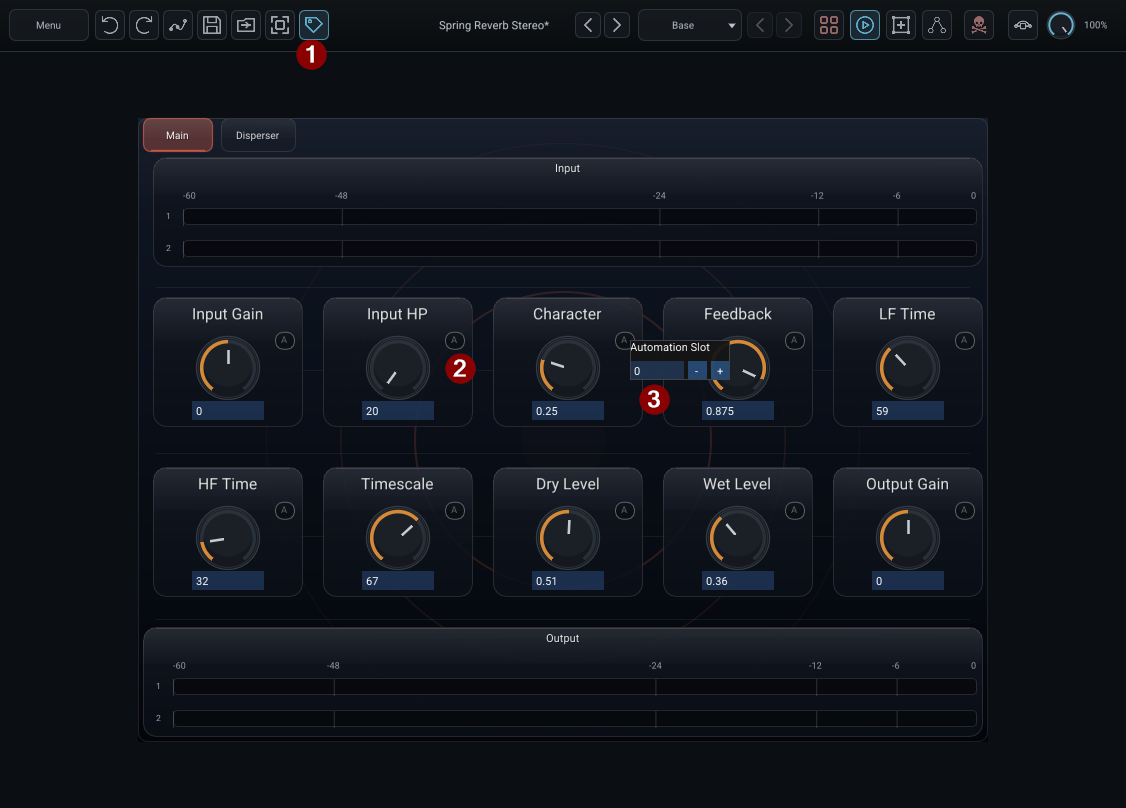
The red numbers identify the three parts of this workflow:
- Show Badges — toggles the front-panel/graph badges on or off. This is useful when you want a cleaner operating view without removing any assignments.
- Automation badge (
A) — appears on front-panel controls that support host automation when badges are visible. Click it to edit that control's slot directly. - Automation Slot popup — enter the one-based slot number.
0means Off;1–64map toAuto 001–Auto 064.
The badge popup and the Automation tab edit the same underlying slot assignment. Use the badge for one control and the manager when you need an overview of the whole patch. Hiding badges changes only the UI; it does not disable automation.
Saved in: Show Badges is DAW/session UI state. The slot assignment itself is DAW-instance automation state. Neither is portable
.p00tchcontent.
What the DAW actually stores
The host automation bank contains the fixed plugin parameters plus the 64 assignable slots. Deepfield keeps both the host slot values and the control-to-slot bindings coherent in the DAW state so a project can reopen with the same routing and current automation values.
[!NOTE] Saved in DAW/session state: automation slot assignments, the host automation parameter values, and the fixed plugin-level parameters such as Bypass, Mix and Kill DSP. These are not portable
.p00tchcontent.
Direct MIDI controller assignments
The MIDI tab maps MIDI directly to automation-capable controls. This is separate from DAW host automation: the incoming MIDI message changes the control itself rather than first targeting an Auto xxx host parameter.
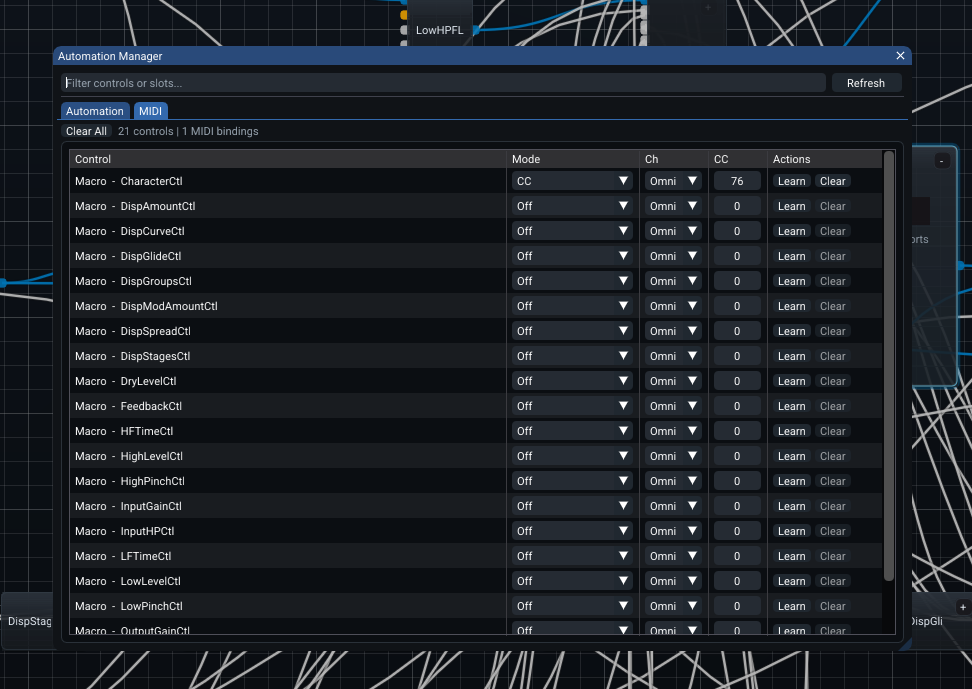
Each row represents one control:
- Control — the graph/control name. Nested controls include enough path information to identify their owner.
- Mode — selects the MIDI message type.
- Ch — restricts the binding to MIDI channels 1–16, or accepts all channels with Omni.
- CC — selects the controller number where that mode uses one.
- Learn — captures the next supported MIDI message for that control.
- Clear — disables only that row's MIDI mapping.
Clear All at the top removes all direct MIDI bindings. It does not alter host automation assignments.
MIDI binding modes
The current direct-binding modes are:
- Off — no direct MIDI binding.
- CC — standard 7-bit MIDI Continuous Controller.
- High Res CC — paired 14-bit CC using controller
0–31for the MSB andCC + 32for the LSB. - Pitch Bend — the channel's Pitch Bend message.
- Channel Pressure — channel aftertouch.
Mod wheel is simply CC 1; it does not need a special binding type.
For High Res CC, choose the MSB controller number in the CC column. For example, selecting CC 1 uses CC 1 as the MSB and CC 33 as the LSB.
MIDI Learn
Press Learn on the target row and move the desired hardware control. Deepfield captures the next supported CC, Pitch Bend or Channel Pressure message. The channel setting already selected in the row is preserved.
While Learn is armed, the button changes to Stop. Use Stop to cancel without changing the mapping.
[!IMPORTANT] Saved in DAW/session state: MIDI mode, channel and controller number. Not saved in
.p00tch: all direct MIDI bindings. The temporary Learn/Stop state itself is runtime-only and is not restored with a project.
Patch values versus assignments
It is useful to distinguish the control value from the thing that controls it:
- the patch defines the control/module and its portable Base/Variant values;
- the DAW instance defines which host automation slot, if any, controls it;
- the DAW instance also defines its direct MIDI mapping, if any;
- the DAW's saved plugin state snapshots the exact live values so the project can reopen as it was left.
Saving a .p00tch therefore does not bake your personal controller setup into the effect.
Program Change and Variants
Variant recall uses the plugin's native host program mechanism rather than scanning MIDI Program Change inside the graph/audio callback.
Deepfield exposes 128 host program positions:
- program 0 = Default/Base
- programs 1–127 = saved Variants in their stored order
A host such as REAPER can translate incoming MIDI Program Change into the plugin's program-selection call. This keeps Variant recall separate from the direct MIDI parameter-binding system and avoids adding Program Change scanning work to the normal graph path.
The program number should be treated as the Variant's position inside the current patch, not as a permanent global identity. Reordering or replacing Variants changes that positional meaning.
[!NOTE] Saved in
.p00tch: Variant definitions, their order and the optional startup Variant. Saved in DAW/session state: the currently active Variant/live program selection. The incoming Program Change message itself is an event and is not stored by Deepfield.
Automation resolution
The patch-level Automation resolution setting controls how frequently host-automation-driven control work is evaluated internally. Use a finer resolution when rapid motion needs more frequent updates; use a coarser setting when a patch contains many control paths and the audible result does not require the highest rate.
[!NOTE] Saved in
.p00tch: Automation resolution. A DAW session also snapshots it as part of the complete live plugin state, but the portable owner of the setting is the patch.
What is not persisted by the manager
The manager's temporary search text, open tab, MIDI Learn armed state and window placement are editing conveniences rather than patch or controller configuration. Do not rely on them as saved state.