Submodules
Submodules let you turn a useful section of a graph into a reusable building block. A submodule has its own internal graph, but it appears as one module in the parent patch.
[!IMPORTANT] Storage: an embedded submodule graph is part of the parent patch's portable
.p00tchdocument. Save Submodule As... creates a separate reusable.subp00tchlibrary file. DAW-instance overlays such as MIDI bindings inside the submodule remain DAW/session state rather than becoming portable submodule content.
In the parent graph, a submodule appears as one compact processor even if its internal graph is large. The example below is HighSpringR: its parent-facing connections are represented by boundary ports, while the Edit button enters the internal graph.
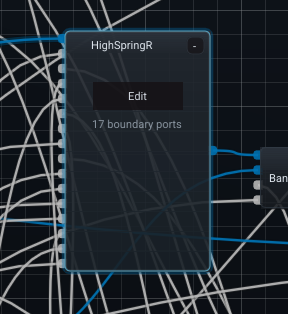
The 17 boundary ports label is a useful reminder that the parent does not see every internal processor. It sees only the inputs and outputs that the submodule deliberately exposes.
Why use a submodule?
Use submodules when a group of processors forms a concept that you want to reuse or reason about as one block, for example:
- a stereo feedback mixer;
- a four-by-four modulation matrix;
- a custom diffusion cell;
- a pitch voice with filtering and gain staging;
- a reusable tempo-synchronised LFO system.
They are organizational and reusable design tools, not an extra audio-processing layer that should add runtime overhead by itself.
Boundary modules
Inside a submodule, symbolic boundary nodes define what the parent sees:
- Submodule Audio In / Audio Out
- Submodule Mod In / Mod Out
- Submodule Param In / Param Out
These boundary nodes are meaningful only inside a submodule graph. During compiled processing, the submodule is flattened into the surrounding audio/control chains and the symbolic boundary connections are rewired to the real parent connections.
Entering and leaving a submodule
Open a Submodule with its Edit button to replace the parent graph view with that submodule's internal graph. The screenshot below shows the inside of the spring-reverb building block used above.
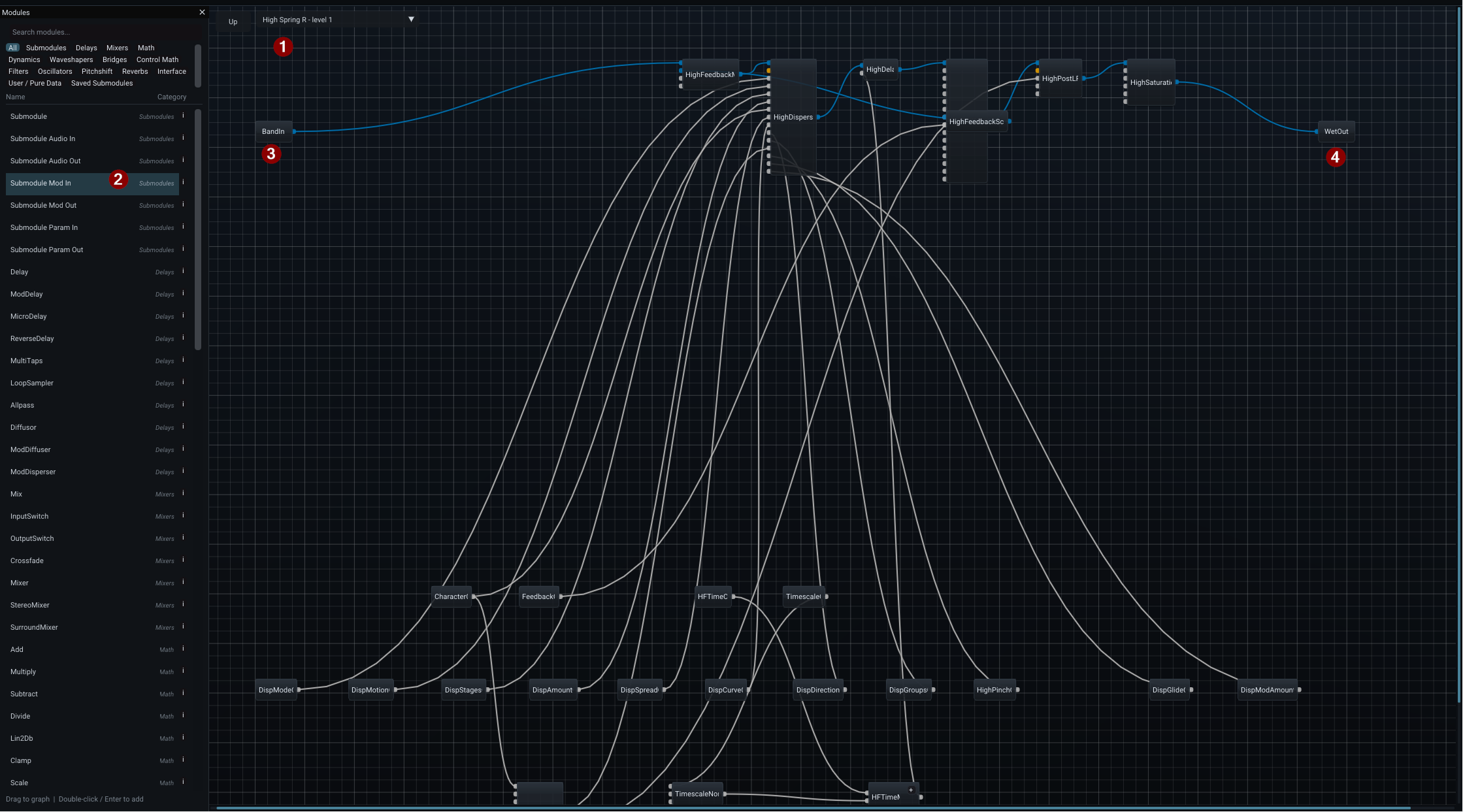
- Breadcrumb / Up navigation — the bar above the canvas identifies the current nested graph (
High Spring R - level 1in the screenshot). Click Up to return to the parent graph. - Submodule boundary module types — while editing a submodule, the Module Browser exposes Submodule Audio/Mod/Param In and Out modules. These are how you define the public interface of the reusable block.
- Input boundary —
BandInis an example of a named boundary entering the internal graph. The parent only needs to connect to that exposed port; it does not need to know which internal processors receive it. - Output boundary —
WetOutis the corresponding example of a signal leaving the internal graph and becoming a parent-facing output.
Nested submodules are supported, so the breadcrumb matters: the plugin window has not changed, but the graph scope has. A command such as delete, paste, undo or add-module acts on the graph level currently being edited.
Tempo and host information
A submodule graph receives the root patch's time-information provider. This means tempo-aware processors inside a submodule continue to receive current host tempo and transport information rather than behaving like isolated graphs with stale timing state.
Undo
Submodule edits participate in the root editing workflow. Cross-scope Undo/Redo notifications make it clear when an Undo operation changed a different graph level from the one currently visible.
Front panel rules
The root front panel binds to root-patch controls. A processor buried inside a submodule should not be added directly to the root front panel because that would make the UI depend on internal implementation details.
If an internal parameter should be user-facing, expose it through the submodule boundary and bind a root-level Interface module to it.
Saving submodules
Use Save Submodule As... to save reusable submodule content as .subp00tch. Saved submodules can be inserted again from the module/preset browsing workflow. Saving the parent .p00tch stores the embedded instance as part of that parent effect; saving .subp00tch creates the reusable library version.
Ordinary next/previous patch navigation skips these saved building blocks; they are library components, not complete effects.